Why Do We Compress Images? The Story of Making Pictures Smaller
Why do images need compression? Learn how lossless and lossy compression reduce file size, how JPEG and PNG work, and why WebP and AVIF followed.
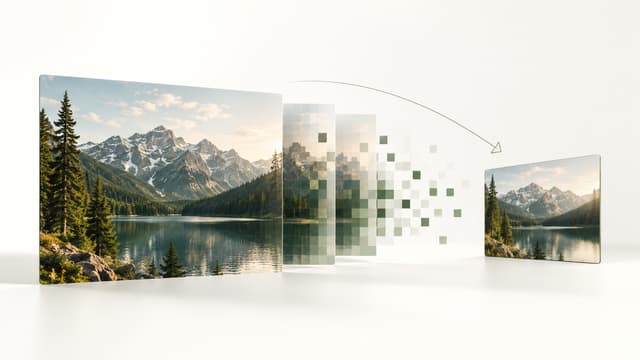
Why do we compress images at all?
Because uncompressed images become large very quickly.
A 1920 × 1080 image contains 2,073,600 pixels. If every pixel stores 8 bits of red, 8 bits of green and 8 bits of blue, the raw RGB pixel data alone occupies 6,220,800 bytes, or about 5.93 MiB.
That is for a single two-megapixel image, before considering metadata, file structure or higher bit depths. Cameras and phones routinely create images with many more pixels.
Compression reduces the amount of data needed to store or transmit an image. That can mean less disk space, faster downloads, lower bandwidth use, smaller attachments and files that fit within upload limits.
The interesting part is that an image does not always need to record every pixel independently. Nearby pixels often resemble each other. Large areas can have similar colours. Photographs contain patterns, smooth gradients and predictable relationships. Compression finds ways to describe that information with fewer bits.
Compression does not always mean losing image quality
There are two fundamentally different ways to make image data smaller.
Lossless compression changes how the data is represented without changing the decoded pixel values. Decompress the image and the original pixels can be reconstructed exactly.
Lossy compression goes further. It deliberately reduces precision or discards information in exchange for a much smaller representation. Once that information has been removed, decoding cannot recreate the exact original pixels.
PNG is commonly used as a lossless image format. JPEG is normally used for lossy photographic compression. WebP and AVIF support modern workflows that can include lossy and lossless modes.
Neither approach is automatically better. The right choice depends on what the image contains and what the image is for.
The real opportunity is redundancy
Imagine saving a photograph by writing down every colour value independently, even when thousands of neighbouring pixels are very similar.
That works, but it ignores structure.
A clear blue sky contains gradual changes. A flat background may contain long regions of nearly identical colour. Even complex photographs contain statistical relationships between neighbouring pixels.
Lossless compression tries to represent those predictable patterns more efficiently. Lossy compression can go further by deciding that some distinctions do not need to be preserved with their original precision.
This idea is much older than JPEG, PNG or the web.
The story starts with information theory
In 1948, Claude Shannon published A Mathematical Theory of Communication in the Bell System Technical Journal.
Shannon was not designing an image format. His work established a mathematical framework for thinking about information, communication and the statistical structure of messages.
One important idea for compression is that a message can contain redundancy. If some symbols or patterns are more predictable than others, a representation can take advantage of that structure instead of treating every possibility as equally expensive.
David Huffman pushed one part of this idea into a practical coding method. His 1952 paper described a way to construct minimum-redundancy codes in which common symbols can be represented efficiently.
Huffman coding would later become one of the techniques used inside many compression systems, including JPEG and the DEFLATE compression used by PNG.
Neither Shannon nor Huffman invented image compression as we know it. Their work helped build the mathematical foundation beneath it.
A second breakthrough was changing how an image is described
Finding repeated or predictable data is only part of the problem. Photographs also needed a representation that made visually important and visually less important information easier to separate.
In 1974, Nasir Ahmed, T. Raj Natarajan and K. R. Rao published their paper Discrete Cosine Transform in IEEE Transactions on Computers.
A discrete cosine transform, or DCT, represents a set of values as combinations of cosine patterns with different spatial frequencies.
For image compression, the useful property is energy compaction: information from a smooth image block often becomes concentrated in a relatively small number of important coefficients, while many higher-frequency coefficients have less influence.
Instead of storing a block only as individual pixel values, an encoder can work with a frequency-like description of the block. That gives it a useful place to reduce precision.
JPEG turned those ideas into a practical photo format
By the 1980s, digital photographs were becoming increasingly useful, but storage and communication systems were tiny by modern standards.
The Joint Photographic Experts Group began its standardization process in 1986. The JPEG 1 standard was created in 1992, with the corresponding ISO version published in 1994.
JPEG was designed for continuous-tone still images, particularly photographs.
Its success came from combining several ideas rather than from one compression trick. A typical JPEG workflow changes the representation of the image, transforms small blocks, reduces the precision of selected information and then encodes the remaining values efficiently.
The result can require dramatically fewer bytes than storing the original RGB pixels directly.
What actually happens inside a JPEG?
A simplified JPEG pipeline looks like this.
JPEG commonly separates brightness information from colour information. Many encoders can also represent colour at a lower spatial resolution than brightness because visual perception is often more sensitive to fine brightness detail than equally fine colour detail.
The image is then processed in small blocks. In baseline JPEG, the familiar transform block is 8 × 8 samples.
The DCT converts each block into coefficients describing different spatial frequencies. Low-frequency coefficients represent broad changes across the block. Higher-frequency coefficients represent progressively finer detail.
Then comes quantization. The coefficients are divided and rounded so that some information is represented with less precision. Many small high-frequency values may become zero.
Quantization is the key irreversible step in ordinary lossy JPEG compression. Entropy coding afterward can represent the remaining values efficiently without introducing additional visual loss.
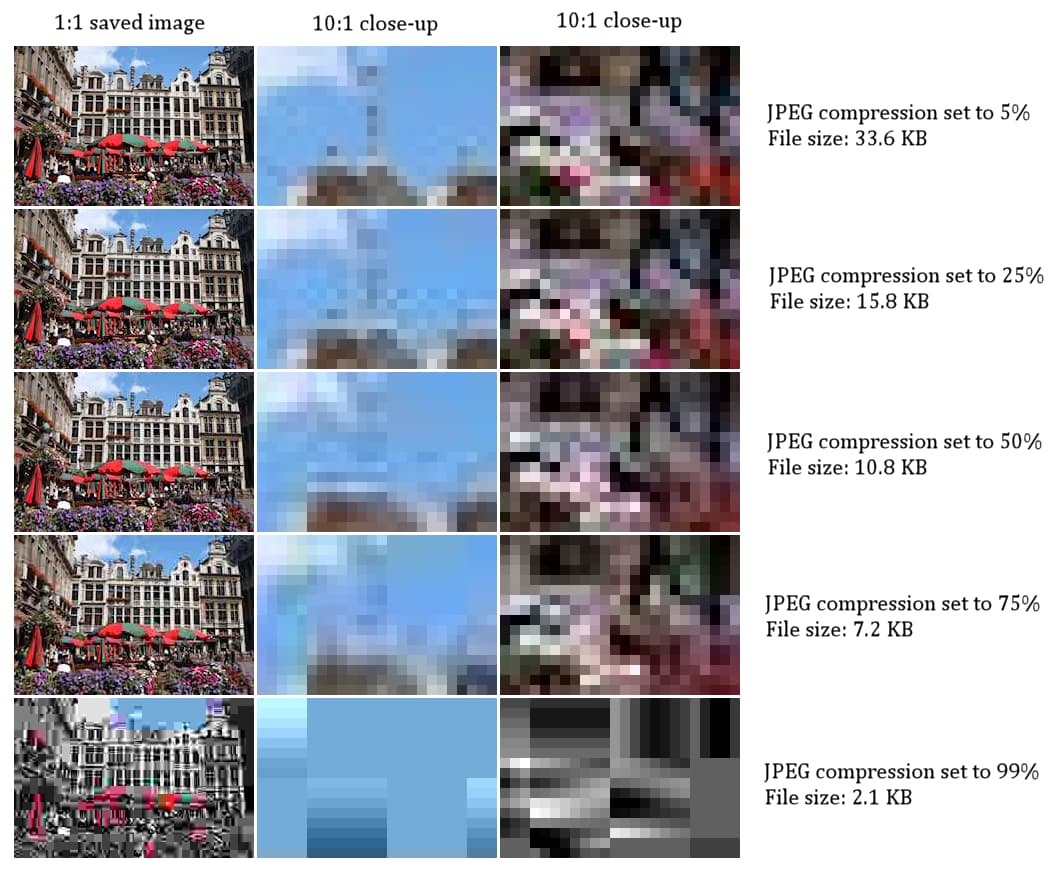
Why heavily compressed JPEGs become blocky
Compression artifacts are the visible evidence of decisions the encoder made while throwing information away.
If quantization becomes aggressive, fine texture disappears first. Smooth gradients can become less smooth. High-contrast edges can develop ringing or halos.
Because baseline JPEG processes small transform blocks, strong compression can eventually make boundaries between those blocks visible too. That is where the familiar square, blocky appearance comes from.
This is why a JPEG quality control is not simply a file-size slider. It changes how much precision the encoder is allowed to spend on the image.
Photographs were only half the problem
JPEG is well suited to many photographs because photographs contain continuous changes in tone and colour where small losses can be difficult to notice.
A screenshot or diagram can behave very differently.
Text contains sharp edges. User interfaces contain thin lines. Logos may use only a few precise colours. A transparent graphic needs an alpha channel so it can blend correctly with different backgrounds.
In those cases, changing nearby pixels can be much more obvious than changing subtle texture in a photograph.
The web therefore needed formats that could reduce file size while still reproducing the original pixels exactly.
GIF came first, then PNG gave the web a lossless alternative
CompuServe introduced GIF87a in 1987. GIF used LZW compression and a palette of up to 256 colours, which made it practical for many graphics used on early online services and later on the web.
PNG was created in December 1994 as a patent-free replacement for GIF and was designed specifically for lossless, portable raster graphics.
The format had stabilized by March 1995, and the first PNG specification became a W3C Recommendation on October 1, 1996.
PNG supports grayscale, indexed colour and truecolour images, with optional alpha transparency. It was designed for online use and progressive display without requiring lossy reconstruction.
The original W3C material was explicit that PNG was not intended to replace JPEG for suitable photographic images. The two formats solved different problems.
How PNG compresses an image without changing the pixels
PNG cannot simply throw away hard-to-see detail because lossless decoding must reproduce the original image samples.
Instead, PNG prepares each scanline using reversible filters. These filters can describe a byte in relation to neighbouring bytes, making predictable image data easier to compress.
The filtered scanlines are then compressed using DEFLATE, the same compression family associated with zlib and common archive formats.
DEFLATE combines dictionary-style matching derived from LZ77 with entropy coding. Repeated or predictable byte patterns can therefore be represented more efficiently.
The filtering step is reversible and the compression step is lossless. When the PNG is decoded, the original image samples can be reconstructed.
This is why PNG can work extremely well for screenshots, diagrams, flat-colour graphics and similar images, yet produce much larger files than lossy formats for complicated photographs.
WebP shifted the focus toward page weight
By 2010, storage was far cheaper than it had been during JPEG's early development, but images had become one of the heaviest parts of the web.
When Google introduced WebP in September 2010, it said images and photographs accounted for about 65 percent of the bytes transmitted per web page at the time.
The initial WebP release focused on lossy photographic compression and was based on technology from the VP8 video codec.
In 2011, Google added a lossless mode and transparency support.
The motivation had shifted slightly. Compression was still about representing an image efficiently, but on the web every unnecessary byte could also mean additional transfer time, mobile data and page-loading cost.
AVIF brought a newer generation of video coding to still images
Modern still-image formats have increasingly borrowed technology developed for video codecs.
AVIF is the AV1 Image File Format. Version 1.0.0 of the specification was published on February 19, 2019.
The format stores AV1 image data inside the HEIF container structure and supports capabilities including high bit depths, HDR-related workflows, wide colour gamuts, transparency and image sequences.
Its attraction is similar to the motivation behind every major compression format before it: describe visual information using fewer bits while retaining enough of what the application needs.
But a newer codec does not make every older format obsolete. Encoding speed, decoding cost, software support, image content, metadata requirements and workflow compatibility still matter.
Why two images with the same dimensions can have very different file sizes
Pixel dimensions tell you how many pixels an image contains. They do not tell you how predictable those pixels are.
Imagine two 1920 × 1080 images. One contains a simple blue gradient. The other contains grass, hair, film grain, tiny text and random noise.
Both contain exactly 2,073,600 pixels, yet the second image contains much more fine variation for an encoder to describe.
Lossless compression generally has less redundancy to exploit in noisy or highly detailed data. Lossy encoders also have to decide how aggressively that detail can be simplified before the visual result becomes unacceptable.
That is why there is no honest rule saying that every image can be reduced by 50 percent, 80 percent or any other fixed amount.
Compression, resizing and format conversion are different operations
People often use the phrase compress an image for several different things.
Compression changes how image information is encoded. A JPEG quality change, PNG optimization or AVIF re-encode can reduce file size while keeping the same pixel width and height.
Resizing changes the number of pixels. Reducing an image from 4000 × 3000 to 1200 × 900 removes millions of pixels before the final file is encoded, so it can have a much larger effect on file size.
Format conversion changes the representation itself. Converting PNG to JPEG, for example, can make a photographic image much smaller, but the result becomes lossy and JPEG cannot preserve an alpha transparency channel.
These operations can be combined, but they solve different problems. A good compression workflow starts by identifying which constraint actually matters.
A target file size changes the question
Sometimes the goal is not simply to make an image smaller. The image has to fit under a specific limit.
Suppose an upload form accepts files up to 100 KB. A 95 KB result already satisfies the requirement. Compressing the same image down to 30 KB may only throw away additional visual information for no practical benefit.
That makes target-size compression a different problem from blindly selecting a low quality value. The useful result is often the least destructive setting that stays under the required ceiling.
If the required size cannot be reached through reasonable compression and the destination allows different dimensions, reducing resolution may become the next option. But that should be a deliberate decision rather than something hidden behind the word compression.
Why image compression still matters when storage is cheap
Storage became cheaper. Internet connections became faster. Cameras also became dramatically better.
The amount of image data grew with them.
Modern phones create high-resolution photographs continuously. Websites deliver many images on a single page. Messaging systems move billions of images. Cloud services keep multiple copies and thumbnails. Forms, email systems and government portals still impose file-size limits.
Compression remains useful because the demand for visual data expands whenever the technology around it improves.
The constraint may be disk space, bandwidth, loading time, mobile data, processing cost or a simple maximum-file-size rule. The underlying problem is the same: move or store the useful visual information without spending more bytes than necessary.
The real goal is not the smallest possible file
Image compression is an optimization problem, not a contest to produce the fewest bytes.
The useful question is: how much information does this image need for its actual purpose?
A product photograph may need fine texture. A tiny thumbnail may not. A screenshot must keep text readable. A logo may need transparency and precise edges. An archival master may need information that a web copy can safely omit.
That is why there is no universal best format, quality setting or compression percentage.
The remarkable part is that today's simple quality controls sit on top of decades of research: Shannon's information theory, Huffman's coding, transforms such as the DCT, JPEG's photographic compression, PNG's lossless web graphics, and newer codec technology behind WebP and AVIF.
The problem has always been the same. Keep the information that matters, represent it efficiently, and avoid spending bits where they provide no useful value.
Sources
- 1.A Mathematical Theory of Communication
Claude E. Shannon, Bell System Technical Journal
- 2.A Method for the Construction of Minimum-Redundancy Codes
David A. Huffman, Proceedings of the IRE
- 3.Discrete Cosine Transform
Nasir Ahmed, T. Raj Natarajan & K. R. Rao, IEEE Transactions on Computers
- 4.JPEG 1
JPEG Committee
- 5.JFIF, JPEG File Interchange Format, Version 1.02
Library of Congress
- 6.Graphics Interchange Format, Version 87a
CompuServe
- 7.
- 8.
- 9.
- 10.
- 11.
- 12.AV1 Image File Format (AVIF), Version 1.0.0
Alliance for Open Media
- 13.JPEG compression image quality degradation comparison
Marek Ślusarczyk / Wikimedia Commons — CC BY 3.0