Why Can a QR Code Still Work When Part of It Is Missing?
A QR code can survive scratches, stains, missing modules, and even a logo. Here is how finder patterns, masking, Reed-Solomon error correction, and carefully engineered redundancy make it possible.
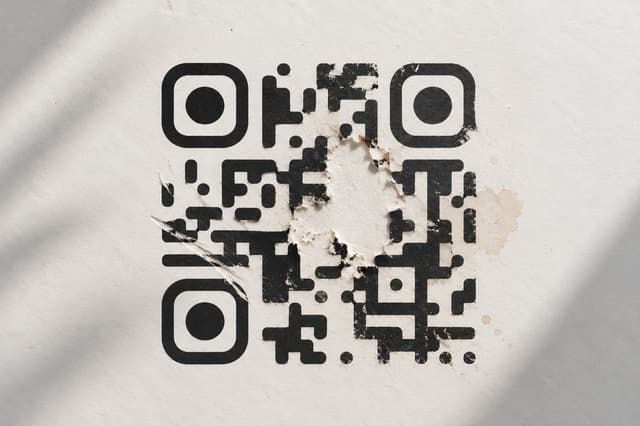
The QR code that should not work
Look at a QR code long enough and a strange thing becomes obvious. It looks fragile. Cover part of it with a sticker, scratch a section, stain it, or put a logo across the middle, and you might expect the information to disappear with the missing squares.
But sometimes it does not. Your phone points at what looks like a damaged mess of black and white modules and, somehow, the original message appears.
That is not a lucky accident. A QR code was deliberately engineered to deal with imperfect physical conditions.
The surprising part is that the QR code does not keep a second photographic copy of the missing area. The recovery comes from something much more interesting: structure, redundancy, and mathematics.
A useful way to think about a QR code is that it is partly a message and partly a set of instructions for reading that message. Before a scanner can recover your URL or text, it first has to figure out where the QR code is, which way it is facing, where its grid begins and ends, and how the encoded information should be interpreted.
A QR code contains more than your message
The black and white squares inside a QR code are not all doing the same job. Some carry the payload. Others help the scanner locate and interpret the symbol. Still others provide mathematical redundancy that can help recover corrupted data.
That means a QR code is better understood as a small communication system than as a picture made out of random squares.
A simplified decoding process looks something like this:
Camera sees the image → finds the QR symbol → determines its orientation and geometry → establishes the module grid → reads format information → identifies the mask and error-correction level → extracts codewords → corrects errors → decodes the original payload.
Real decoders involve considerably more detail than this simplified sequence, but the mental model matters. Error correction is only one part of the process. If the scanner cannot locate or geometrically interpret the symbol in the first place, the mathematical redundancy in the data cannot save it.
Those three big squares are not your data
The three large square patterns near the corners are called position detection patterns, or finder patterns. They are one of the most recognizable parts of a QR code, and they have a very practical purpose: helping the scanner locate the symbol and determine its orientation.
DENSO's development history describes the search for a pattern that would be unlikely to be confused with ordinary printed material. The resulting structure has a distinctive black and white ratio of 1:1:3:1:1. Placing these patterns at three corners gives a scanner strong visual landmarks from which it can recognize the code and determine its orientation.
This is one reason QR codes can be scanned from different directions. The scanner does not have to assume that the code was printed perfectly upright.
There is an important consequence here. If you damage a random collection of data modules, the error-correction system may be able to recover the information. If you destroy critical structural patterns that the scanner needs in order to understand the symbol, the problem can happen much earlier in the decoding process.
So the three big squares are not three pieces of your URL. They are more like landmarks on a map that tell the scanner where it is looking.
The QR code also contains a grid for the scanner to follow
The finder patterns are only the beginning. A QR symbol contains other functional patterns that help the scanner understand its geometry.
Timing patterns run horizontally and vertically between the finder patterns. Their alternating dark and light modules help establish the spacing of the QR grid and provide information about the center of the symbol.
Larger QR symbols also use alignment patterns. These smaller square structures help correct position and angle deviations caused by distortion. This becomes particularly useful when a QR code is large, viewed at an angle, or printed onto a curved surface.
This is another reason a QR code is more sophisticated than it looks. The scanner is not simply counting black squares. It is reconstructing a geometric coordinate system from the image captured by the camera.
And then there is the quiet zone
There is also a seemingly empty area surrounding the QR symbol called the quiet zone. It is not part of the encoded message, but it is important to reliable detection because it helps separate the QR symbol from surrounding visual material.
This explains a common failure that has nothing to do with damaged data. A QR code can contain perfectly valid information but still become difficult to detect if surrounding graphics, borders, text, or other objects crowd the symbol too closely.
In other words, a QR code needs some breathing room before its internal error-correction machinery even gets a chance to help.
The QR code has to tell the scanner how to read itself
Some of the information surrounding the payload describes how the symbol should be interpreted. Among other things, QR format information identifies the selected error-correction level and the mask pattern used for the symbol.
That detail is easy to overlook, but it reveals something elegant about the design. The QR symbol does not merely contain a message. It also contains information that helps the decoder understand the rules under which that message was encoded.
Think of it like opening a file that contains both the data and enough information to tell the software how the data should be interpreted.
Why do QR codes look so random?
Now we reach one of the less visible tricks in QR encoding: masking.
The data inside a QR code is not simply placed onto the grid and left there. QR encoding defines eight possible mask patterns. The encoder applies candidate masks to the data area and evaluates the resulting symbols using penalty rules designed to avoid visually troublesome patterns.
The reason is practical. Some arrangements of black and white modules are easier for a scanner to misinterpret than others. Long runs, large blocks, excessive imbalance between dark and light modules, or patterns resembling important structural shapes can make recognition harder.
The encoder therefore chooses a mask that produces a more scanner-friendly arrangement.
This leads to one of the strangest facts about QR codes: the visual pattern is partly engineered to make the underlying data easier to read. What looks like visual noise is not simply noise.
Masking is not encryption. Anyone with a QR decoder can reverse it. Its purpose is to improve the optical characteristics of the symbol, not to hide the information.
A QR code can deliberately make its data look less like a QR code
This is especially clever because QR finder patterns have a distinctive structure. If arbitrary payload data could freely create similar patterns, the scanner could encounter misleading shapes while searching for the actual symbol.
The mask selection process helps discourage problematic visual arrangements in the data area.
So the QR code is doing something unusual: it is deliberately transforming the appearance of its own data so that the resulting symbol is easier for a machine to recognize.
Now we get to the part that actually repairs damaged data
Once the scanner has found the symbol and reconstructed its geometry, it can start extracting the encoded information.
This is where error correction enters the story.
QR Codes use Reed-Solomon error correction. Instead of storing only the original data, the encoding process adds additional mathematical information derived from that data.
Those additional values are not a second copy of the URL. They are redundancy that creates mathematical relationships between the encoded symbols.
If some of the encoded information is later corrupted, the decoder can use those relationships to determine what the corrupted information was supposed to be.
It is not storing a backup copy of the QR code
This distinction is worth making because the usual explanation of QR error correction is often misleading.
You may hear that a QR code stores the same information multiple times. That is a useful beginner's metaphor, but it is not what Reed-Solomon error correction actually does.
The encoder generates additional codewords mathematically from the original data. The decoder can then use the redundancy contained in those codewords to detect and correct certain kinds of corruption.
A better analogy is a puzzle with extra constraints. If several pieces are damaged, the remaining relationships can provide enough information to determine what those pieces must have been.
The missing black square is not secretly stored as another black square somewhere else. What exists elsewhere is mathematical information that can make the missing information recoverable.
What Reed-Solomon actually gives the QR code
Reed-Solomon codes are designed to add redundancy in a way that allows a decoder to recover from a certain amount of corrupted information.
QR Code implements this error-correction mechanism at the codeword level. A QR codeword consists of 8 bits, and the amount of redundancy allocated to a symbol depends on the selected error-correction level.
The important idea is not the polynomial mathematics behind Reed-Solomon. It is the tradeoff. More redundancy gives the decoder more information with which to recover from corruption, but that redundancy occupies space that could otherwise be used for the payload.
That tradeoff is fundamental to the entire system. Reliability is not free.
The four error-correction levels
QR Codes provide four standard error-correction levels: L, M, Q, and H.
DENSO describes their approximate data-restoration capabilities as about 7%, 15%, 25%, and 30% respectively. Level M is commonly selected, while Q or H can be appropriate for environments where dirt or damage is more likely.
But there is an extremely important detail hidden behind those percentages.
They describe restoration capability in terms of total codewords. They do not mean that you can simply cover 30% of the visible QR picture and expect it to keep working.
That distinction is critical because a QR symbol contains structural regions as well as data and error-correction regions. The location and nature of the damage matter.
The famous 30% claim is not what people think it is
One of the most repeated QR myths is that Level H means a logo or obstruction can safely cover 30% of the visible QR code.
That is too simplistic.
DENSO's figures are defined around codewords. A codeword is an 8-bit unit used in the data area. The correction capability is therefore a property of the encoded symbol and its error-correction structure, not a simple percentage of visible black and white pixels.
Even within the visible symbol, different regions have different jobs. Damaging a finder pattern, for example, can interfere with locating the symbol itself. Damaging the quiet zone can interfere with detection. Damaging data modules is a different problem.
That is why there is no universal rule saying that a QR code can always lose exactly 30% of its visible area and remain readable.
Not all damage is equal
Imagine two QR codes with exactly the same amount of visible damage.
In the first, the damaged region happens to affect encoded data while leaving the important finder, timing, alignment, and surrounding areas usable.
In the second, the same-sized obstruction covers a critical finder pattern or interferes heavily with the scanner's ability to establish the grid.
Those two codes can behave completely differently.
The percentage of missing area is therefore only one variable. The location of the damage, the selected error-correction level, the symbol version, the density of the code, the physical size of the modules, image quality, contrast, distortion, and the particular decoder can all affect the result.
This is why logos can work inside QR codes
A logo placed over the center of a QR code is essentially a controlled form of obstruction. Some of the underlying modules become invisible to the scanner.
The reason this can work is the same reason a scratched or stained code can sometimes work: the encoded symbol contains redundancy that allows some corrupted information to be reconstructed.
But the existence of error correction does not turn a QR code into a free-for-all design canvas.
A large logo, poor contrast, damaged finder patterns, insufficient quiet zone, tiny modules, aggressive distortion, or low-quality printing can still make a code fail.
The correct mental model is not 'error correction gives me permission to cover anything.' It is 'error correction gives the decoder some recovery capability when the symbol is imperfect.'
More error correction is not automatically better
It might sound obvious to choose the highest error-correction level every time. More recovery capability sounds like a free upgrade.
It is not.
Increasing the error-correction level means allocating more of the symbol to redundancy. That reduces the amount of payload that can be carried at a given version and can make the symbol denser or larger for the same information.
If you are putting a short URL on a clean digital display, the maximum correction level may be unnecessary. If you are printing a code in a dirty industrial environment or intentionally placing a small logo over it, stronger correction can make more sense.
The right level is therefore a design decision based on the environment and the purpose of the QR code.
QR versions change the amount of information the symbol can hold
QR Codes are available in different versions. Standard QR versions range from Version 1, which has a 21 by 21 module symbol, up through Version 40, which has a 177 by 177 module symbol.
As the version increases, the symbol gains more modules and can carry more information. But capacity also depends on the type of data being encoded and the selected error-correction level.
This creates another engineering tradeoff. A short URL can fit into a relatively small symbol. A longer payload needs more space. Increasing error correction also consumes part of that available capacity.
That is why two QR codes containing the same general type of information can look noticeably different in size and density.
The original problem had nothing to do with Instagram logos
Modern QR codes are associated with menus, payment screens, tickets, websites, packaging, and logos. That was not the original problem they were designed to solve.
QR Code was developed by DENSO in Japan in the 1990s for manufacturing. Automotive production was moving from mass production toward high-mix, low-volume manufacturing, which meant production systems needed to handle substantially more information.
Traditional barcodes were reaching their practical limits for the amount of information required. The new system needed to hold more data in a small physical area and still be read quickly.
But there was another constraint: factory environments are not pristine. Codes could be exposed to dirt, oil, contamination, physical damage, and difficult printing conditions.
DENSO's own history describes the QR Code as being designed to remain scannable even when part of the code was contaminated.
The three squares came from a scanning problem
The development team did not simply add three decorative squares because they looked recognizable.
They needed a way for a scanner to find the symbol quickly and reliably among other printed material. The distinctive position-detection pattern and its placement at three corners became one of the defining features of QR Code.
DENSO's development history describes the project as beginning in 1992 with only two people and reaching a completed QR Code in 1994 after extensive trial and error.
The name QR came from 'Quick Response', reflecting the emphasis on fast reading.
From factory equipment to the phone in your pocket
QR Code was first developed for industrial information management, but its design solved problems that turned out to be useful almost everywhere.
The technology was standardized through several industry and national standards before becoming an ISO/IEC international standard in 2000. DENSO also made the standardized specifications publicly available and chose not to enforce its patent rights for standardized QR Codes, helping the technology spread.
Mobile phones later made QR scanning accessible to ordinary consumers. What began as a manufacturing technology eventually became a general-purpose bridge between physical objects and digital information.
There are actually two different ways a QR code can fail
This distinction explains a huge number of QR-code problems.
The first kind of failure is optical or geometric. The scanner cannot reliably locate, interpret, or map the symbol. Severe blur, poor contrast, distortion, insufficient quiet zone, tiny modules, or damage to critical position-detection structures can cause problems here.
The second kind of failure happens after the scanner has successfully interpreted the symbol well enough to extract encoded information. Now the issue is corrupted data, and error correction can potentially recover it.
In simplified terms:
Detection asks: 'Can I understand what this symbol is and where its grid is?'
Error correction asks: 'Now that I have the encoded information, can I recover the parts that were corrupted?'
Reed-Solomon cannot repair a QR code that the camera cannot properly locate or geometrically interpret in the first place.
A mathematically recoverable QR code can still be physically unreadable
This is one of the most important practical lessons from QR technology.
A symbol can have enough mathematical redundancy to recover damaged codewords and still fail in the real world because the camera cannot distinguish the modules clearly enough.
Printing introduces its own problems. Small modules can blur together. Low contrast reduces separation between dark and light regions. Curved surfaces distort geometry. Glare can wash out parts of the symbol. Poor cameras and difficult lighting add another layer of uncertainty.
That is why QR reliability is not determined by the error-correction level alone.
The full system includes the encoding, the physical symbol, the printing or display process, the camera, image processing, and the decoder.
What happens when you put a QR code on something curved?
A QR code is a flat grid, but the world is not always flat.
A code printed on a curved bottle, wrapped around a cylinder, photographed at an angle, or viewed under perspective distortion no longer appears as a perfect square to the camera.
Alignment patterns and the geometry encoded into the symbol help the decoder compensate for some of these distortions. But there are limits. Enough distortion can prevent reliable reconstruction of the module grid.
Again, the important distinction is that QR technology does not simply make damaged pixels disappear. It gives the scanner multiple forms of structure and redundancy that help it reconstruct the intended symbol.
Why the same QR code can look different in different places
Put the same URL into two QR generators and you may not get visually identical symbols.
That does not necessarily mean one of them is wrong.
The final symbol depends on choices such as the QR version, encoding mode, error-correction level, and selected mask. The mask alone has eight possible patterns, and the encoder chooses among them based on the resulting symbol's characteristics.
The important thing is that different visual arrangements can still encode the same underlying payload.
So how much of a QR code can actually be damaged?
There is no single universal percentage that answers this question.
The specification provides defined error-correction capabilities, but real-world damage tolerance depends on what was damaged and how the symbol is presented to the scanner.
A small obstruction over an ordinary data region can be less problematic than a smaller obstruction over a critical structural pattern. A clean digital display can behave differently from a low-quality print. A large, high-contrast symbol can behave differently from a tiny, dense one.
This is why claims such as 'you can cover 30% of a QR code' should be treated cautiously. The specification's percentages describe error-correction capability in terms of codewords, not a universal percentage of visible area that can be removed under every condition.
The deeper lesson is about redundancy
QR codes are a practical example of a much broader idea in information theory and communications engineering.
When information travels through a physical or noisy system, corruption is inevitable. A scratch on a label, interference in a signal, a damaged storage medium, or a bad camera frame can change what the receiver sees.
One way to make communication more reliable is to add redundancy. You deliberately transmit more information than the bare minimum required to represent the original message, allowing the receiver to detect and sometimes correct corruption.
QR Code turns that principle into something you can literally print on a piece of paper.
A QR code is not a picture of information. It is an encoded system.
This is probably the most useful way to think about the technology.
The black and white pattern you see is the physical representation of a much more structured system. Some modules help locate it. Some establish geometry. Some communicate decoding parameters. Some carry payload data. Some carry redundancy. Masking shapes the visual appearance of the data region so the scanner is less likely to encounter troublesome patterns.
When part of that system is damaged, the result depends on which parts were damaged and whether the remaining structure and redundancy are sufficient for the decoder to reconstruct what it needs.
That is why a QR code can sometimes look half-destroyed and still work perfectly.
The next time you see a damaged QR code
Do not think of it as a broken picture that somehow survived.
Think of it as a communication system that was designed with failure in mind.
The scanner first has to recognize the symbol. The finder patterns help it locate and orient the code. Timing and alignment structures help it reconstruct the grid. Format information tells it how to interpret important parts of the symbol. Masking helps keep the visual pattern scanner-friendly. Reed-Solomon redundancy gives the decoder a way to recover from certain corrupted codewords.
And all of those pieces work together before your phone finally turns a field of tiny squares into a URL, a contact, a Wi-Fi configuration, or a payment destination.
That is the real reason a damaged QR code can still work.
It was never designed to be just a picture.
If you want to make your own QR code
The practical side is much simpler than the engineering underneath it. You can create a QR code, choose the information it should contain, adjust its appearance, and select an appropriate error-correction level without needing to understand Reed-Solomon mathematics.
If you are designing one for real-world use, the important thing is to treat reliability as a combination of factors rather than relying on error correction alone. Keep strong contrast, preserve the quiet zone, avoid obscuring critical patterns, make the modules large enough for the intended scanning distance, and test the final result on actual devices.
You can create and test QR codes with the Olivez QR Code Generator.
Sources
- 1.QR Code Error Correction Feature
DENSO WAVE
- 2.What is a QR Code?
DENSO WAVE
- 3.QR Code Development Story
DENSO WAVE
- 4.QR Code History
DENSO WAVE
- 5.QR Code Technology
DENSO
- 6.QR Code 30th Anniversary
DENSO WAVE
- 7.QR Code Standardization
DENSO WAVE
- 8.ISO/IEC 18004:2024
International Organization for Standardization
- 9.
- 10.
- 11.QR Code Print Quality Research
Journal of Imaging
- 12.Barcode and QR Code Scan Reliability
ScienceDirect
- 13.Error-Correcting Abilities of QR Codes
TU Delft Repository